Post actualizado el día octubre 27, 2026 by DeiviSanzPlay
Finding a scientific calculator that actually runs on Windows without installing a bunch of junk is harder than it should be. Most options either force you through an installer, push ads, or hide half the functions behind a paywall. The DSG Full Portable Scientific Calculator skips all of that. You download one .exe file, double-click it, and you’re solving integrals, trig equations, and factorials in seconds. No setup wizard, no registry garbage, no admin rights needed.
I’ve tested enough portable math tools to know the difference between «portable» and «portable-ish.» This one is the real deal: it runs straight from a USB stick or any folder, so your portable scientific calculator for PC travels with you and leaves zero trace on whatever machine you plug it into.
Why a Portable Scientific Calculator Beats an Installed One
Think about where you actually need a calculator: a lab PC, a shared school computer, a work laptop locked down by IT, or a friend’s machine. Installing software in those places is either impossible or a bad idea. A free portable scientific calculator sidesteps every one of those problems because it doesn’t touch the system.
There’s also the speed angle. Opening Windows’ built-in calculator is fine for 2+2, but it collapses the moment you need logarithms, radians, or factorials. The DSG tool boots instantly and gives you the full scientific keyboard right away.
One caveat worth being honest about: because it’s portable, it won’t create file associations or Start Menu shortcuts. If you want it pinned to your taskbar, you’ll have to do that manually. Small trade-off for zero bloat.
What’s Actually Inside This Scientific Calculator Download
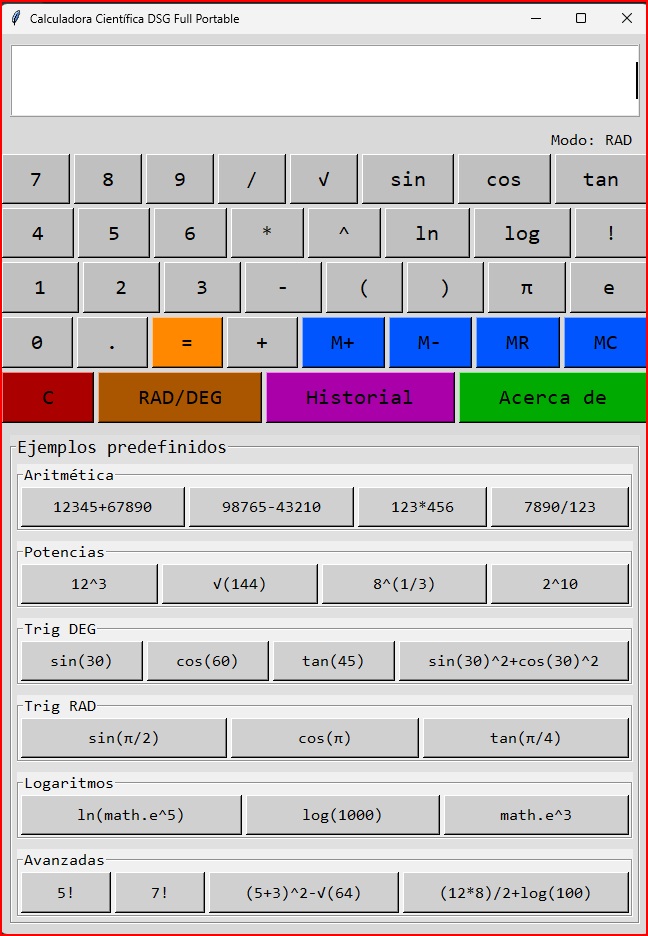
The feature list reads like a proper scientific calculator, not a stripped-down toy. Here’s what you get the moment you launch it:
- Trigonometry: sine, cosine, and tangent, switchable between degrees and radians with a single toggle.
- Logarithms: natural log (ln) and base-10 log, both one click away.
- Powers and roots: square roots and arbitrary exponents without hunting through menus.
- Factorials: the ! operator for combinatorics and advanced math work.
- Built-in constants: π and Euler’s number (e) ready to drop into any expression.
- Memory keys: M+, M-, MR, and MC for storing and recalling intermediate values.
- Calculation history: the last 50 operations are kept in a dedicated window so you can backtrack.
That combination covers virtually everything a student, engineer, or analyst needs from a scientific calculator download for Windows. The RAD/DEG toggle alone saves you from the classic mistake of feeding degrees into a radian function and getting nonsense back.
Precision Matters: The Tech Behind the Numbers
Here’s the part most portable calculators get wrong. They run on standard floating-point math and quietly accumulate rounding errors. Ask one to compute something like 0.1 + 0.2 and it may hand you 0.30000000000000004. That’s unacceptable when you’re doing real work.
The DSG calculator is built in Python using the tkinter library for the interface and the Decimal module for the math engine. That means it works with arbitrary-precision decimal arithmetic instead of sloppy binary floats. For anyone doing financial calculations, scientific measurement, or engineering tolerances, this is the difference between a tool you trust and one you double-check against a spreadsheet.
It also handles invalid input gracefully. Type something mathematically impossible and it tells you instead of crashing or spitting out garbage.
How to Get It Running in Under a Minute
There’s no learning curve here, but the sequence is worth spelling out:
- Grab the executable file Calculadora Científica DSG Full Portable.exe from the official source.
- Drop it anywhere — desktop, USB drive, cloud folder — and double-click it.
- Start typing expressions directly or use the on-screen buttons.
- Click About to open the full online guide if you want the deeper documentation.
Every button includes a pop-up tooltip describing what it does, which matters more than it sounds. If you haven’t used a scientific calculator since high school, those hover hints get you fluent fast without reading a manual.
Predefined Examples: The Fastest Way to Learn
Most people ignore documentation and just poke at buttons until something works. The DSG calculator plays to that instinct by shipping with ready-made examples covering arithmetic, trigonometry, logarithms, and more. You load one, see the syntax, tweak a number, and suddenly you understand the whole interface.
For a free scientific calculator with no installation, that built-in scaffolding is genuinely useful. It turns a blank grid of symbols into something you can learn by doing in five minutes flat.
Who Should Actually Use This
Students who need a reliable calculator on a locked-down school PC: yes. Engineers who want a scratchpad for quick trig or log checks without opening MATLAB: yes. Anyone who works across multiple machines and hates reinstalling the same tool: absolutely yes.
Who should skip it? If you need graphing, symbolic algebra, or matrix operations, this isn’t a replacement for something like a CAS tool. This is a precise, fast, portable scientific calculator — not a full computer algebra system. Knowing that boundary saves you from disappointment.
The bottom line: it’s free, it’s portable, it does the math correctly, and it doesn’t ask anything of your system. Download it, throw it on a USB stick, and stop babysitting installers every time you need to crunch numbers.