Post actualizado el día September 27, 2026 by DeiviSanzPlay
Oyeee, has it ever happened to you that you see a great TikTok, you swipe past it, and then you CAN’T FIND IT anymore? 😫
Well don’t cry, because here I’ll show you how to view your <a href="https://www.chusmeando.com/informatica-y-tecnologia/como-editar-videos-para-tiktok-rapido-capcut-gratis-trucos-efectos-virales/” title=”Cuales son los mejores programas de Pc para crear videos para tiktok”>history of watched videos on TikTok 🔥👇
I recommend you check out this article, it’s interesting: <a href="https://www.chusmeando.com/flores-y-plants/por-que-se-dry-las-tips-de-las-leaves-de-las-plantas/” title=”Por qué se secan las puntas de las hojas de las plantas” class=”internal-recommendation” target=”_self” rel=”noopener”>Why the tips of plant leaves dry out.
📲 From the app itself (the easiest way)
✅ Open TikTok
✅ Go to your profile (by tapping your little face at the bottom right)
✅ Tap the three lines at the top right ☰
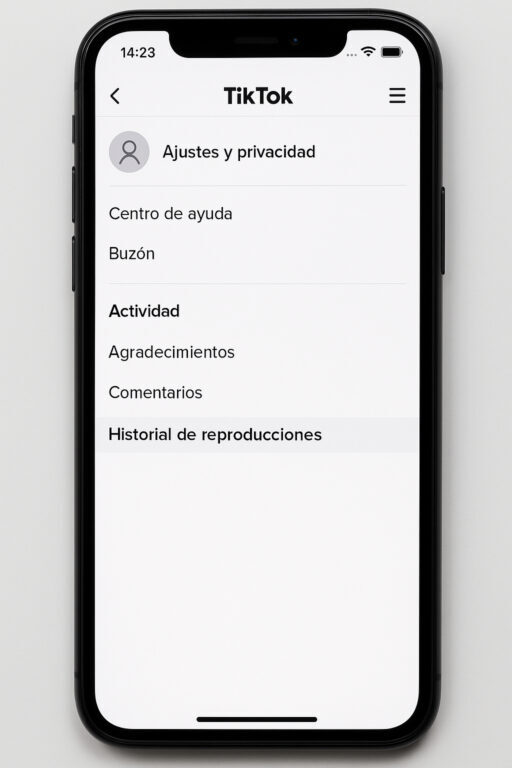
✅ Go into “Settings and privacy“
✅ Scroll down to where it says “Activity” and tap “Watch history”
🎥 And that’s it! There you’ll see ALL the videos you watched recently, even if you didn’t like them 🕵️♂️
(Yes, TikTok saves EVERYTHING 👀)
🧠 Extra pro tip:
🔍 If you can’t find the history there (sometimes it doesn’t show up on all accounts), do this:
✅ Tap the magnifying glass (Search)
✅ Type: watched videos or watch history
✅ TikTok will show you a direct option to go to your history (as if by magic ✨)
📌 Things to keep in mind:
❌ If you watched the video without logging in… tough luck 😔
💾 The history gets deleted over time, so if you want to save something: LIKE IT or SAVE IT 🫶
🤫 You can also delete your history, in case you’re team privacy hehe
And thaaat’s it. Now you have no excuse to lose that recipe TikTok, that creepy storytime, or that crush that slipped away from your “For You” page 😅
📩 Tag your friend who’s always looking for “that TikTok I saw yesterday but it doesn’t show up anymore” 🤡
#TikTokTips #TikTokHistory #ISawIt #NoMoreLostOnes